

- All in One
- GoPOS - Point of sale
- Mobile waiter 2.0
- GoKDS
- GoKiosk
- E-Menu
- Numbering system
- Payment processing
- GoPOS integrations
- See available equipment
Have a question about using GoPOS?
Contact us to arrange a meeting and select solutions for your premises. We especially recommend contact via chat.
Check how GoPOS works in practice!

- Full service
- Fast service
- Pizzeria
- Hotel Restaurant
- Coffee Houses
- Food Truck
- Club/Bar
- Networks
- Entertainment Complexes
- Retail
Have a question about using GoPOS?
Contact us to arrange a meeting and select solutions for your premises. We especially recommend contact via chat.
Digital QR Code Menu - scan, order, pay!
Forget about traditional menu cards! Now your guests can view menus on their phone, order directly at the table and pay online - while you speed up service and increase sales. Implement contactless ordering and reduce the number of waiters you employ with QR menus. Find out how easy it is to implement them at your place!
Have you got a question? Contact sales
Increase sales by
28%
Accelerate service by
32%
Increase customer satisfaction o
38%
How does the QR Code Menu work?
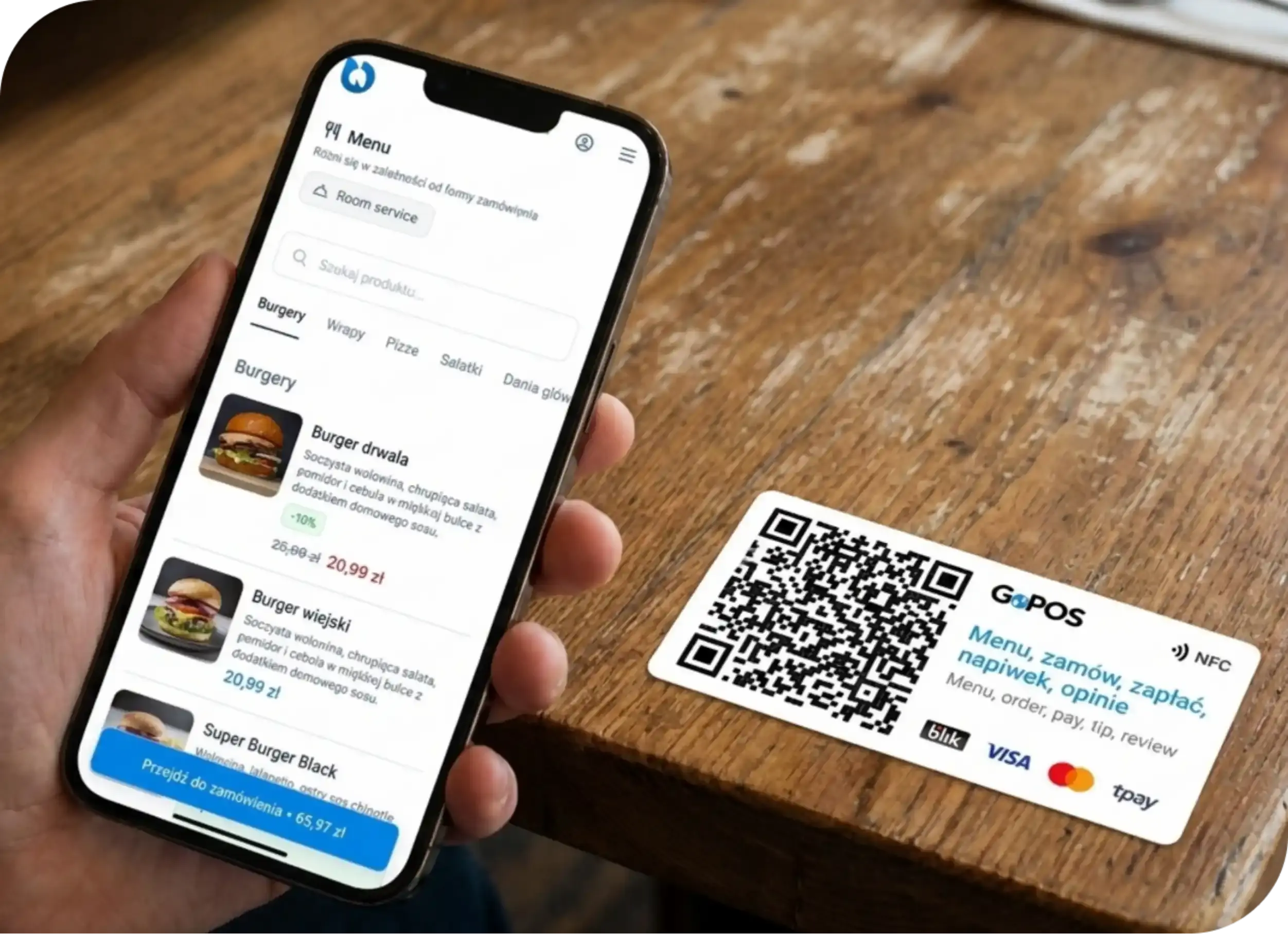
Guests scan the QR code placed on the table and your restaurant's menu immediately opens on their phone. Depending on the version you choose, they can just browse the menu or place their order straight away.
Without application
The e-menu opens directly in the browser and is tailored to any type of smartphone.
A menu that is always up to date
You edit it in seconds and any changes are immediately visible to customers. No more replacing paper menus.
Support for multiple languages
You can introduce any number of versions of the menu in foreign languages, designed specifically for foreign visitors.
Fast track to a modern menu. No printing, no designing – we do it for you!
Menu for preview or with ordering function?
The electronic menu is available in two versions - choose the one that better suits the specifics of your establishment.
Enter the E-menu in the preview version
Replace the paper menu with a modern solution! By selecting the view version your guests will be able to scan the QR code and instantly see your restaurant's current offerings.
- Promote new products and special offers - you can instantly introduce offers that will be highlighted on your menu, increasing their sales.
- Up-to-date presentation of dishes - photos, ingredients, allergens and current promotions.Your menu will be in sync with what's happening in the restaurant.
- Fast and convenient menu editing in the administration panel - all changes are visible in real time.
How does it work?
Discover how the digital menu works ** in the preview version.**

Add a QR code
Place it where it will be visible to customers - on tables, in the shop window or on advertising material.

Guest scans the code
Simply point the camera at the code and your digital menu will open in the browser on the customer's smartphone.

Guest browses the menu
The visitor sees the current offer, photos, ingredients and the latest promotions - all in a great-looking mobile version.

Without waiter, without waiting - orders straight from your phone!
By choosing the version with the ordering function your guests will not only be able to scan the code and browse the menu, but also place orders and pay online - without having to wait for a waiter!
- Faster table turnover - guests are not waiting for service, which reduces the average time of their visit, so the restaurant earns more.
- Increased order value - customers have more time to choose, and tailored menu recommendations encourage more spending.
- Fewer order mix-ups - what the guest has selected goes directly into the POS system, eliminating misunderstandings with staff.
- Guests order and pay on their own - more convenience for customers and less work for staff.
How does it work?
Discover what is different about the QR Code Menu in the ordering version.

Scan the QR code
Your menu is displayed on the customer's phone in a convenient mobile version

Place an order
The guests choose their own menu items and their order goes directly to the kitchen.

Pay
Customers can pay online directly on their smartphone or choose to pay at the waiter's desk - complete flexibility.

Where will the QR Code Menu fit the best?
The digital menu will work well in any food and drink establishment - regardless of its size or type of service. QR codes can be placed:
- On the tables in the restaurant - guests order themselves, waiters save time
- At the door of the premises or in the food truck - customers place their orders without queuing
- On flyers and posters - guests can check the menu and order personal pick-up before visiting the premises
Switch to digital menus today!
Fill in the form and we will get back to you with all the details regarding the introduction of a QR Code Menu in your establishment.



GoOrder with E-menu is the perfect solution for our restaurant. At the beginning, it supported our premises during the pandemic, which allowed us to quickly switch to self-service sales, and now it continues to facilitate customer service. When switching from classic table menus to E-menu, we did not expect that it would improve the operation of the premises so much and, above all, that it would be positively received by customers. This is a huge convenience and, importantly, speeds up the execution of orders.

Choose your pricing package
Check out the available pricing plans and choose the best one for your business.
Up to -19%
Per yearPer month
Looking for other solutions for your business?
Besides the QR Code Menu, we have an extensive package of solutions to help you take comprehensive care of the operations in your establishment.

GoPOS
Communication and service
A fast, reliable and intuitive sales system, designed for any business.
Show more
Mobile waiter
Communication and service
A tool that improves the work of waiters in the premises. It allows you to shorten the service time for guests by up to 30%
Show more
GoKDS
Communication and service
Kitchen Display System allows you to display orders directly on the computer or tablet screen in the kitchen.
Show more
GoStock
Management
A warehouse system that allows you to conveniently manage inventory in any place and time.
Show more
Inventory application
Management
A system that allows you to carry out a quick and error-free inventory of your premises.
Show more
GoOrder
Delivery
An application for handling online orders and a commission-free store with online orders for gastronomy.
Show more
GoHub
Delivery
Integration with the biggest giants in the delivery world, enabling to take orders on the POS.
Show more
GoDelivery
Delivery
GoDelivery tools to speed up the handling and fulfilment of takeaway orders.
Show more
GoCRM
Loyalty solutions
A loyalty system that allows you to prepare individual loyalty cards or vouchers.
Show more
System number
Communication and service
An application that assigns individual numbers to orders and displays them on a TV screen in the premises.
Show more
GoKiosk
Communication and service
An app that enables a contactless ordering or shopping process at self-service outlets.
Show more
GastroSupplier
Management
An innovative tool that will show the best prices from various wholesalers and assign them to the final order.
Show more
GoPOS Now
Management
A system that allows you to manage your premises from any device and anywhere in the world.
Show more
Staff solutions
Management
A tool for full control, supervision and faster settlements of the work team.
Show more

Application for drivers
Delivery
A tool for controlling the work of suppliers and billing them quickly by hours and kilometres.
Show more
Integrations
Integrations
Integrations with external systems, extending the software with further useful functionalities.
Show moreGoPOS supports the growth of different companies
Our customer success stories show how our sales systems improve management, efficiency and profits in a variety of sectors. Let yourself be inspired and see how GoPOS can transform your business.


GoPOS support restaurant with two Michelin stars - Bottiglieria 1881!
Discover how the implementation of modern sales solutions has improved management and customer service.
Find out more
Fast service and smart management in the Woosabi chain of restaurants
See how automation and better communication have accelerated orders and reports have improved network management.
Find out more
Foodhall Montownia improves operational efficiency by 37%
See how our solutions have automated on-premises management and increased sales efficiency.
Find out moreGoPOS support restaurant with two Michelin stars - Bottiglieria 1881!
Discover how the implementation of modern sales solutions has improved management and customer service.
Find out moreAlready trusted by +6000 venues!
Join the group of satisfied customers.


Frequently asked questions
Tips and answers from the GoPOS Team.
A QR code menu is a digital menu that opens on a guest’s phone after scanning a QR code. It replaces traditional printed menus and allows guests to browse the restaurant’s current offer, including photos, descriptions, ingredients, and allergens. In the ordering version, it also enables placing orders and making online payments directly from the phone - without waiting for a waiter.
A QR code menu does not require an app - the guest scans the QR code at the table and the menu opens directly in the phone’s browser. In the view-only version, guests browse the menu, while in the ordering version they can also place orders and pay online. Orders are sent to the POS system and, after staff approval, forwarded to the kitchen, reducing errors and speeding up service.
QR code menus allow you to update the menu in real time. Guests open the menu on their phone and browse at their own pace. Once recommendations are configured, the system automatically suggests matching add-ons, which can increase order value. In the ordering version, guests place orders from their smartphone, which are sent to the POS system and, after staff approval, to the kitchen - reducing mistakes and potentially speeding up service.
You create a QR code menu in GoPOS in two steps. First, in the admin panel you add menu items (dish names, prices, and optionally photos and descriptions). If you already use GoPOS, you can send your existing menu to the e-menu without retyping it from scratch. Then you generate QR codes in the GoPOS online ordering module (GoOrder) and download them for printing or order ready-made stickers from the GoPOS team. After saving and syncing changes, guests will see the updated menu after scanning the code.
The attractiveness of a QR code menu depends primarily on the content you add - appetizing dish photos and engaging descriptions. In the GoPOS admin panel, you organize the menu into clear categories and can add language versions for international guests. The system automatically displays the menu in a modern, responsive mobile layout adapted to any smartphone.
In GoPOS, the QR code menu is already integrated with the online ordering system. By choosing the ordering version, guests can browse the menu, place orders, and pay online after scanning the code. Orders are sent to the POS system for approval and then forwarded to the kitchen.